> ## Documentation Index
> Fetch the complete documentation index at: /llms.txt
> Use this file to discover all available pages before exploring further.
# Make your first video in the Studio app
> Describe a video in one sentence, answer the agent's questions, approve a storyboard, and get your first video in the HyperFrames Studio app.
Type one sentence on Home and choose **Let's go**. The agent may ask a question or two, shows you the video as stills,
and builds it when you approve.
*Recorded with Claude Code as the agent. The waits play fast: the storyboard took 29 minutes and the
build 10.*
## What happens
**1. Say what you want**
In **Make something**, describe the video ("A 12-second launch teaser for Lumen, a running shoe that glows at
night"). Add files with **+**, or start from a video you like in **Reference**.
**2. Answer its questions**
When something matters and you didn't say it, the agent asks with a card: which of three concepts, how the
product should look, or whether to use your own image. Pick one (the agent marks the one it recommends), or choose
**Something else…** and type, then **Send answer**.
**3. Approve the storyboard**
With **Start with a storyboard** on (the default), you see every shot as a still with its timing in the
**Storyboard** tab. Tell it which frame to change, or choose **Build the video**.
**4. Watch, then change it**
The finished video plays in **Preview**. Change anything by saying it, pointing at it or drawing on it:
[edit a video with the agent](/studio-app/edit-with-the-agent.md).
If you aren't signed in or have no agent yet, the app walks you through that first and then sends your request.
> [card] [Practice it: The brief](https://hyperframes.heygen.com/lessons/the-brief)
>
> Free 20-minute lesson with a short video, a quiz and a brief to try. A brief is the goal, who it is for, two to four specifics and the exact words in quotes.
## Or take the step by step
**Take the step by step**, next to **Remix from inspiration** on Home, builds a launch video from four parts taken
from real launch videos. It also opens by itself the very first time.
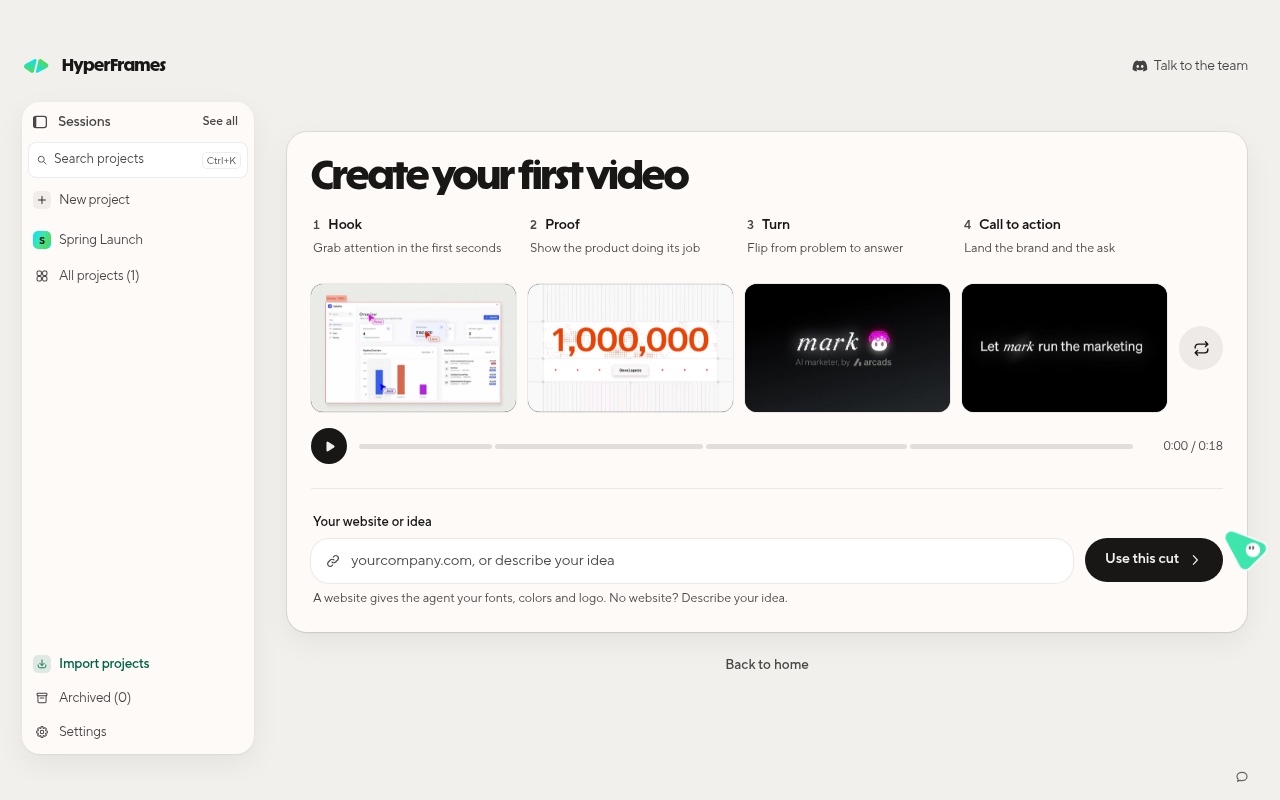
The first-video card: four parts, then your website or idea.
| Part | What it does |
| - | - |
| **Hook** | Grab attention in the first seconds |
| **Proof** | Show the product doing its job |
| **Turn** | Flip from problem to answer |
| **Call to action** | Land the brand and the ask |
Shuffle the parts until you like them, type your website (it gives the agent your fonts, colors and logo) or an idea,
and choose **Use this cut**.
## Related topics
* [Edit a video with the agent](/studio-app/edit-with-the-agent.md)
* [Use your brand kit](/studio-app/brand-kits.md)
* [Connect your agent](/studio-app/connect-your-agent.md)